
Wiki
Wiki
What Is Routing?
What Is Routing?
Sonoros includes a Virtual Patchbay that lets you reroute audio channels during a show without working in a routing matrix. It models the behaviour of a traditional patchbay, using a DirectOut hardware device to execute the changes in the real world.
How it works
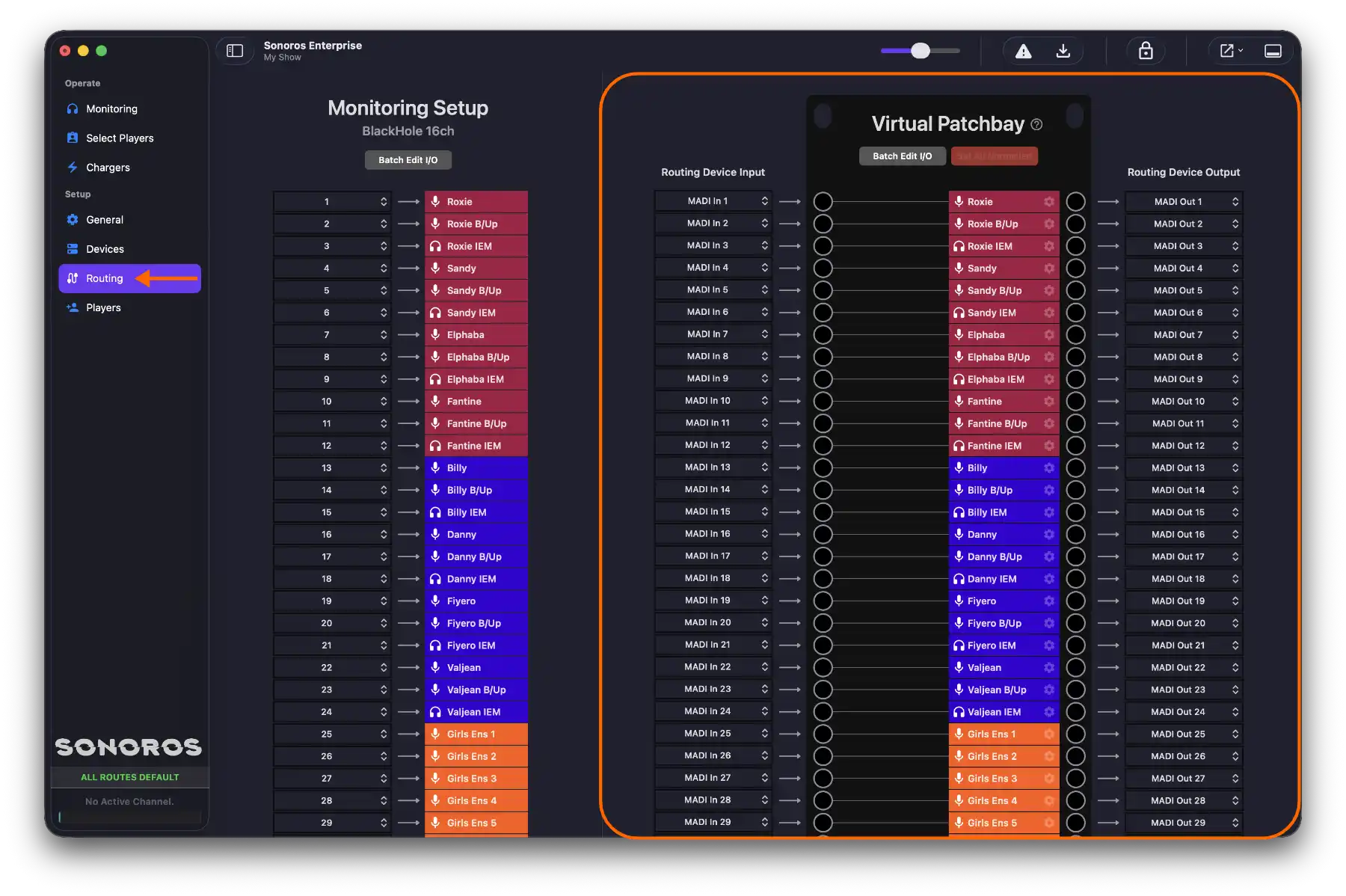
Think of the Sonoros Virtual Patchbay like a Bantam patchbay with nothing plugged in. In that state, signal flows through normally: input 1 goes to output 1, input 2 to output 2, and so on. This is called the normalled state.
When you need to reroute a channel, you insert a virtual patch cable to override the normal flow. For example, if a transmitter fails mid-show, you can patch a spare mic across to that channel's output without anyone on stage or at the desk needing to do anything. The DirectOut device receives the change and updates the physical routing immediately.
When you remove the patch, the signal returns to its normalled route. Sonoros provides multiple context-sensitive ways to apply a patch, so you can work quickly regardless of what you are looking at.
Why not a routing matrix?
A matrix forces you to think in terms of rows and columns, which makes it easy to patch the wrong thing. It is also hard to see at a glance what has been changed from the default state.
The Virtual Patchbay shows you the normalled state as the baseline, and makes patches visible on top of it. You can see exactly what has been overridden and what is running normally, which matters when you are working fast during a show.
What you need
Patching requires a DirectOut routing device connected to Sonoros. Without one, Setup > Routing will not be active.
For setup instructions, see Setting Up a Routing Device. For instructions on making and removing patches, see Making Patches.
Where to monitor from
Your Input Device (see Audio Monitoring & Streaming) is a separate signal path from the Virtual Patchbay, so where it taps into your system matters.
If it's fed from before the routing device, your monitoring never actually passes through the patchbay, so you'll hear the original signal regardless of any patches you make. Feed it from after the routing device instead, and what you hear will reflect those patches in real time, matching what's actually happening in the real world.
For Dante-based routing devices, we'd suggest monitoring via Dante Virtual Soundcard (DVS): it lets you patch your monitoring input from the routing device's Dante output in Dante Controller, so what you hear always reflects the current routing rather than the original source. See Dante Setup for how to configure DVS.
Sonoros includes a Virtual Patchbay that lets you reroute audio channels during a show without working in a routing matrix. It models the behaviour of a traditional patchbay, using a DirectOut hardware device to execute the changes in the real world.
How it works
Think of the Sonoros Virtual Patchbay like a Bantam patchbay with nothing plugged in. In that state, signal flows through normally: input 1 goes to output 1, input 2 to output 2, and so on. This is called the normalled state.
When you need to reroute a channel, you insert a virtual patch cable to override the normal flow. For example, if a transmitter fails mid-show, you can patch a spare mic across to that channel's output without anyone on stage or at the desk needing to do anything. The DirectOut device receives the change and updates the physical routing immediately.
When you remove the patch, the signal returns to its normalled route. Sonoros provides multiple context-sensitive ways to apply a patch, so you can work quickly regardless of what you are looking at.
Why not a routing matrix?
A matrix forces you to think in terms of rows and columns, which makes it easy to patch the wrong thing. It is also hard to see at a glance what has been changed from the default state.
The Virtual Patchbay shows you the normalled state as the baseline, and makes patches visible on top of it. You can see exactly what has been overridden and what is running normally, which matters when you are working fast during a show.
What you need
Patching requires a DirectOut routing device connected to Sonoros. Without one, Setup > Routing will not be active.
For setup instructions, see Setting Up a Routing Device. For instructions on making and removing patches, see Making Patches.
Where to monitor from
Your Input Device (see Audio Monitoring & Streaming) is a separate signal path from the Virtual Patchbay, so where it taps into your system matters.
If it's fed from before the routing device, your monitoring never actually passes through the patchbay, so you'll hear the original signal regardless of any patches you make. Feed it from after the routing device instead, and what you hear will reflect those patches in real time, matching what's actually happening in the real world.
For Dante-based routing devices, we'd suggest monitoring via Dante Virtual Soundcard (DVS): it lets you patch your monitoring input from the routing device's Dante output in Dante Controller, so what you hear always reflects the current routing rather than the original source. See Dante Setup for how to configure DVS.